Notifications and reminders - how do you use them?

We use notification and reminder emails for our mandatory courses. As we do not want to overwrite the global template given it might be used elsewhere we have to customise the wording and copy and paste it each time. This is a real rigmarole and can lead to errors and often the spacing has a mind of its own and doesn't look right meaning we have to test this every time to check it looks ok. In the past I did ask if these templates could be saved so they are ‘once and done’ and can be applied to a specific course. How have others got around this, do you use these email templates? Do you edit them? Would love to hear how others are doing it! Inspire me! Am I missing an obvious trick that would make our lives easier?
-

Ahead of implementation, we customised all of the emails we planned to use and disabled the ones we didn't. Those customisations were often simple - add a banner that brought a little colour to the message and aligned with the look and feel of our Learn branding, and updated the sign off to include a couple of different email addresses (we've two learning teams). The core of the message was largely unchanged - we just wanted to look more like an internal email rather than a system-driven notification. Beyond these, we customise certain emails for certain programmes.
1 -

Richard could you please share how you added a banner into your email templates i'd love to know this.
Thanks
0 -
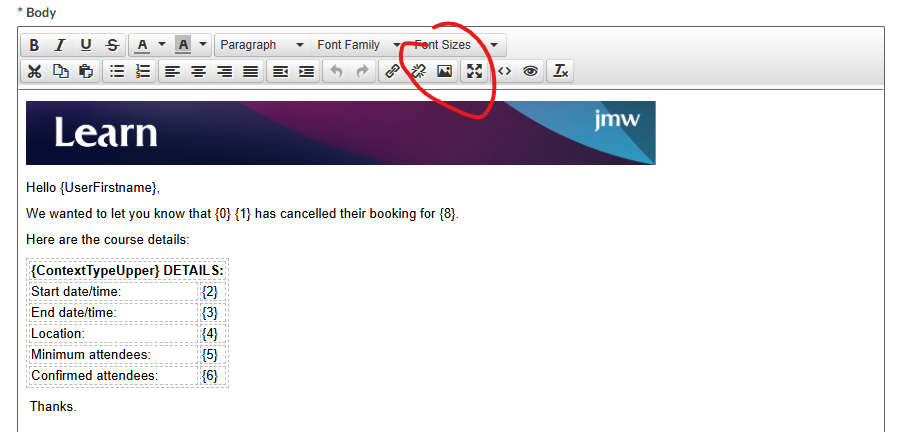
Hey Kerry. I created the image outside of Learn and imported it using the highlighted button. You just have to play around withe size of the image using the dimensions function that pops up when you click it. Seems to reassure people that it's not just a random email.
 3
3 -
Hi Richard
Thanks for sharing this I think it looks a lot better! Definatley using this tip.
1
Please sign in to leave a comment.
Comments
4 comments